
作者: ts_bum 時間: 2026-4-14 23:05 標題: bambulab X2D


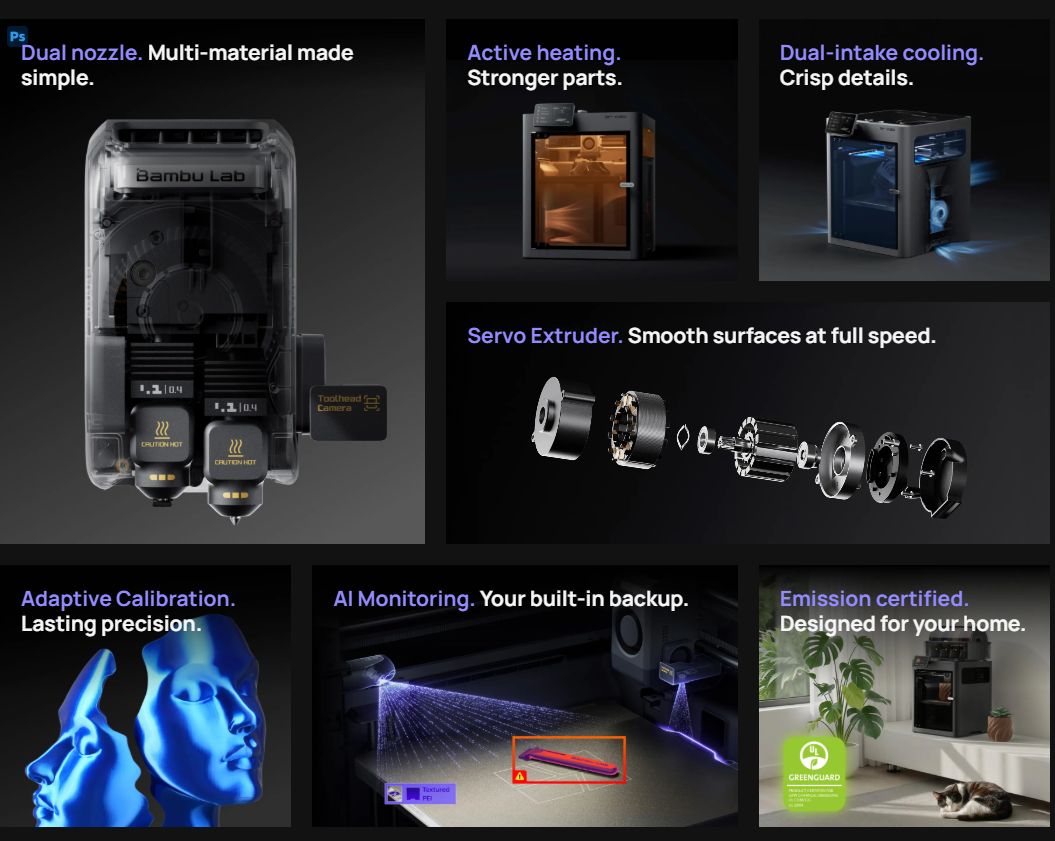
https://bambulab.com/en/x2d
 圖片附件: x2D.jpg (2026-4-14 23:03, 107.51 KB) / 下載次數 8
https://h0.hkepc.com/forum/attachment.php?aid=2522343&k=4edaa77f22707edc657626c0354a7a0d&t=1781087343&sid=97t8XunT0V
作者: Offer 時間: 2026-4-14 23:44
冇乜驚喜。但係好平
作者: ts_bum 時間: 2026-4-15 00:44
冇乜驚喜。但係好平
Offer 發表於 2026-4-14 23:44

只係dual Nozzle + cam! 畀多100美金!
買咗P2S!
 不過冇投訴!
作者: Offer 時間: 2026-4-15 08:18
只係dual Nozzle + cam! 畀多100美金!
買咗P2S! 不過冇投訴!
ts_bum 發表於 2026-4-15 00:44
買得拓竹都应该冇投訴
作者: xo_ox 時間: 2026-4-15 08:55
只係dual Nozzle + cam! 畀多100美金!
買咗P2S! 不過冇投訴!
ts_bum 發表於 2026-4-14 16:44
Yes , only $1000 difference ...


作者: hambaba 時間: 2026-4-17 00:11
見到個價差P2S咁少 道心破碎...
作者: Offer 時間: 2026-4-17 08:33
見到個價差P2S咁少 道心破碎...
hambaba 發表於 2026-4-17 00:11
科技野預左啦,佢今次定價好有吸引力,我都心動
作者: 雀雀 時間: 2026-4-17 09:08
第二個頭好像有新設計, 是否會比 H2D 慢呢?
作者: boldhk 時間: 2026-4-17 10:32
想問唔用VPN,是否都可以用到lan mode同可以update firmware?
作者: Offer 時間: 2026-4-17 11:07
想問唔用VPN,是否都可以用到lan mode同可以update firmware?
boldhk 發表於 2026-4-17 10:32
应該未有人试过,始终係新机,你可問客服
作者: ts_bum 時間: 2026-4-17 12:40
想問唔用VPN,是否都可以用到lan mode同可以update firmware?
boldhk 發表於 2026-4-17 10:32
用緊P2s答你,冇vpn只可以用lan mode,不可以update firmware!
佢會話你在不支援地區!
作者: ts_bum 時間: 2026-4-17 12:52
見到個價差P2S咁少 道心破碎...
hambaba 發表於 2026-4-17 00:11
睇你需求有冇用!其實副頭都有限制!例如印細左。限左d料。
另外就係好似h2d咁其實好多人都覺得dual nozzle麻麻地。
不過都係有新當然買新,俾多1000買p~>x 糸!
買左P2s 覺得又冇咩衝動。
作者: hambaba 時間: 2026-4-17 13:55
本帖最後由 hambaba 於 2026-4-17 14:03 編輯
睇你需求有冇用!其實副頭都有限制!例如印細左。限左d料。
另外就係好似h2d咁其實好多人都覺得dual nozz ...
ts_bum 發表於 2026-4-17 12:52
除左首發果班 P2SC大部分人都係4000人仔買
而家比多600就買到X2DC 你單單幫P2SC買輔助風扇+外排氣+濾心 呢到已經要比350人仔
600蚊 你點幫P2SC加溫倉(已經有人反映P2SC強行加溫倉會令外殼彎曲),輔助風扇,外排氣,多一個遠頭,皮帶由2升級成1.5,可以用編碼板.熱床最高可以上120
不過有P2SC就唔值得升 部P2SC玩多幾年直接升多色好過...
事實上如果佢要賺到盡就唔應該出P2SC.直接出X2D好過
大家冷靜落黎 大部分人都唔會考慮P2SC升X2DC. 更加唔會再為P2S升配件
P1點解以前咁多人買 就係佢同X1個價錢有好大距離.但而家只係差600~1000,咁仲有冇必要買P2SC
作者: ts_bum 時間: 2026-4-17 14:19
本帖最後由 ts_bum 於 2026-4-17 14:21 編輯
除左首發果班 P2SC大部分人都係4000人仔買
而家比多600就買到X2DC 你單單幫P2SC買輔助風扇+外排氣+濾心 ...
hambaba 發表於 2026-4-17 13:55
我買外排加filter$120人仔左右 已經覺得好夠!反而呢排潮濕啲料成日都要烘乾,覺得麻煩d,其實冇乜後悔!
其實Reddit已經有人講x2d外殼都變形!
如果買左P2s ,我又覺得冇需要介懷!
作者: boldhk 時間: 2026-4-17 14:22
用緊P2s答你,冇vpn只可以用lan mode,不可以update firmware!
佢會話你在不支援地區! ...
ts_bum 發表於 2026-4-17 12:40
download落SD卡,本地update firmware都唔得嗎?
作者: ts_bum 時間: 2026-4-17 15:02
download落SD卡,本地update firmware都唔得嗎?
boldhk 發表於 2026-4-17 14:22
可以,但係冇最新firmware
作者: hambaba 時間: 2026-4-17 15:29
可以,但係冇最新firmware
ts_bum 發表於 2026-4-17 15:02
離線果D佢地拖好耐先會出
唔用佢手機APP可以直接買大陸版
作者: xo_ox 時間: 2026-4-17 19:42
China vpn update firmware , ok no problem
作者: ts_bum 時間: 2026-4-18 00:09
本帖最後由 ts_bum 於 2026-4-18 00:13 編輯
除左首發果班 P2SC大部分人都係4000人仔買
而家比多600就買到X2DC 你單單幫P2SC買輔助風扇+外排氣+濾心 ...
hambaba 發表於 2026-4-17 13:55
Review: 第二個Right Nozzle 輔助打印頭, 唔係打印得好靚 [Time 9:33]! 都係有辣有唔辣!
[youtube]NTSp5zFRX0I[/youtube]
作者: Offer 時間: 2026-4-18 00:41
Review: 第二個Right Nozzle 輔助打印頭, 唔係打印得好靚 [Time 9:33]! 都係有辣有唔辣!
...
ts_bum 發表於 2026-4-18 00:09
遠程送丝已做得不錯,只能用時間交換重量
作者: xo_ox 時間: 2026-4-18 09:29
科技野預左啦,佢今次定價好有吸引力,我都心動
Offer 發表於 2026-4-17 00:33
Ching , still p1sc or p2sc ?
作者: xo_ox 時間: 2026-4-18 09:57
Review: 第二個Right Nozzle 輔助打印頭, 唔係打印得好靚 [Time 9:33]! 都係有辣有唔辣!
...
ts_bum 發表於 2026-4-17 16:09
雙頭的好處是不同材料打印
- support 面會好好多
- 又可 tpu+pla/petg/etc 做活動胶位
- …
作者: Offer 時間: 2026-4-18 11:45
Ching , still p1sc or p2sc ?
xo_ox 發表於 2026-4-18 09:29
P1SC 官翻大陸版,買了两年打了1700小時仍然好用,當時4848人仔直運到户
作者: Offer 時間: 2026-4-18 11:48
China vpn update firmware , ok no problem
xo_ox 發表於 2026-4-17 19:42
其實仲有一個方法,返大陸玩2天,手機set vpn server,家中router set vpn client. 叫人幫你update FW

作者: Offer 時間: 2026-4-18 11:50
講真,拓竹最成功係生態圈令小白易入手,最吾好係限区
作者: xo_ox 時間: 2026-4-18 12:32
本帖最後由 xo_ox 於 2026-4-18 11:19 編輯
其實仲有一個方法,返大陸玩2天,手機set vpn server,家中router set vpn client. 叫人幫你update F ...
Offer 發表於 2026-4-18 03:48
咁不如借一個 vpn rpi Router比你update啦!
作者: xo_ox 時間: 2026-4-18 12:34
講真,拓竹最成功係生態圈令小白易入手,最吾好係限区
Offer 發表於 2026-4-18 03:50
是的已變成了一個生態,有機 有零件 有材料 又有大量打印模型!
將以前蘋果手機,之前無app store 加下加下⋯⋯
作者: Offer 時間: 2026-4-18 14:05
咁不如借一個 vpn rpi Router比我你update啦!
xo_ox 發表於 2026-4-18 12:32
你忘记了?我部机冇鎖的,可自由update及出街用手机app,不过是大陸版app
作者: xo_ox 時間: 2026-4-18 14:46
本帖最後由 xo_ox 於 2026-4-18 06:47 編輯
你忘记了?我部机冇鎖的,可自由update及出街用手机app,不过是大陸版app ...
Offer 發表於 2026-4-18 06:05
是呀是呀,你真幸福,我p1s及p2s都要vpn
… 或其他Ching在港島東,可找我⋯
作者: boldhk 時間: 2026-4-18 15:57
想問如果只係做異料support或者只係打印雙色,是否就唔需要AMS?
作者: ts_bum 時間: 2026-4-18 16:16
想問如果只係做異料support或者只係打印雙色,是否就唔需要AMS?
boldhk 發表於 2026-4-18 15:57
yes
作者: boldhk 時間: 2026-4-18 16:24
本帖最後由 boldhk 於 2026-4-18 16:27 編輯
yes
ts_bum 發表於 2026-4-18 16:16
Thanks!!
總覺得AMS有點鷄肋。唔明雙頭機點解唔出個4進2出的AMS?
作者: xo_ox 時間: 2026-4-18 16:59
本帖最後由 xo_ox 於 2026-4-18 10:36 編輯
Thanks!!
總覺得AMS有點鷄肋。唔明雙頭機點解唔出個4進2出的AMS?
boldhk 發表於 2026-4-18 08:24
AMS 2 pro, 有焗功能,又方便了好多的!
有人用雙料抽濕盒,直入x2d 都可以用到雙頭⋯
一般硬料,petg/pla,p2s可以的只是慢一點及浪費料一點⋯
但tpu最好雙頭,主tpu, 副頭可用其他
作者: Offer 時間: 2026-4-18 19:04
想問如果只係做異料support或者只係打印雙色,是否就唔需要AMS?
boldhk 發表於 2026-4-18 15:57
Yes,但係有AMS係必需的,好玩好多
作者: xo_ox 時間: 2026-4-18 22:01
因為不同材料,Pla, petg, ams 2, 要根據最低溫度的抽濕,
所以pla+petg不能抽得太好,所以買多一個ams 2, 來分開不同材料放入不同ams2,
之後ams ht 平($714),又買了一個,所以現在是;
-2x ams2 + ams ht
作者: xo_ox 時間: 2026-4-20 21:07
終於又可以入X2d呢個家庭囉!
買机先⋯
作者: xo_ox 時間: 2026-4-21 00:23
21號,真的加返$500添,好彩今次買到!
作者: hambaba 時間: 2026-4-21 12:00
21號,真的加返$500添,好彩今次買到!
xo_ox 發表於 2026-4-21 00:23
羨慕屋企咁多位..我等佢遲啲下放多色系統落中階機先換…
作者: xo_ox 時間: 2026-4-21 13:03
羨慕屋企咁多位..我等佢遲啲下放多色系統落中階機先換…
hambaba 發表於 2026-4-21 04:00
Also no space, just sold out my P2S with very lower price...

P2D ? or wait for 【拓竹官方翻新】X2D ... tobe $46xx- , P2Sc【官翻新】@$38xx-
作者: ts_bum 時間: 2026-4-21 13:15
Also no space, just sold out my P2S with very lower price...
P2D ? or wait for 【拓 ...
xo_ox 發表於 2026-4-21 13:03
恭喜曬!
老虎叫我唔好買, 一係買部top model!
但係冇$$ 作者: xo_ox 時間: 2026-4-21 13:21
恭喜曬!
老虎叫我唔好買, 一係買部top model! 但係冇$$
ts_bum 發表於 2026-4-21 05:15
Ha ha , It is the top model of "X"...
On one day, exchange the old one with the new one, nobody know that

same size
作者: ts_bum 時間: 2026-4-21 14:37
本帖最後由 ts_bum 於 2026-4-21 14:38 編輯
Ha ha , It is the top model of "X"...
On one day, exchange the old one with the new one, nob ...
xo_ox 發表於 2026-4-21 13:21
一開始佢嫌棄呢部細叫買h系, 我話初初用 平平地玩住先!
你出咗部 p2s 幾錢?
作者: xo_ox 時間: 2026-4-21 14:41
本帖最後由 xo_ox 於 2026-4-21 07:03 編輯
一開始佢嫌棄呢部細叫買h系, 我話初初用 平平地玩住先!
你出咗部 p2s 幾錢? ...
ts_bum 發表於 2026-4-21 06:37
$29xx the main unit only, and keep the AMS 2.
But it is good time for X2Dc <- $46xx
"H" unit is good , but the size look too big for home use ...
Most printing part ~100-200mm
作者: xo_ox 時間: 2026-4-22 09:15
this talk good ... some user side
[youtube]ZvTcMPTGqpU[/youtube]
作者: alanwong912 時間: 2026-4-22 15:53
回覆 29# xo_ox
ching 可否請教個操作係點? 依家部P1S 用左一段時間, 見X2D 陸版好吸引

作者: alanwong912 時間: 2026-4-22 15:55
回覆 43# xo_ox
你出果部P2S 係咪陸版?
作者: xo_ox 時間: 2026-4-22 17:01
回覆 xo_ox
ching 可否請教個操作係點? 依家部P1S 用左一段時間, 見X2D 陸版好吸引 ...
alanwong912 發表於 2026-4-22 07:53
Ching在港島東? I have a VPN Router(by rpi), connect its wifi and could update ...
作者: xo_ox 時間: 2026-4-22 17:07
本帖最後由 xo_ox 於 2026-4-22 09:12 編輯
回覆 xo_ox
你出果部P2S 係咪陸版?
alanwong912 發表於 2026-4-22 07:55
Sure !
for the price "陸版" is very nice.
X2Dc rmb$50xx+150ship, or hk$8000(us$949+50 for bambulab site)
豐澤 : Bambu Lab 拓竹 X2D Combo 3D列印機 | 包含AMS 2 Pro 【國際版】HK$8,699
https://www.fortress.com.hk/zh-h ... 55?variant=14101355
作者: alanwong912 時間: 2026-4-23 10:39
回覆 48# xo_ox
我果部國際版 P1S, 諗起用咗唔夠半年一放蝕到傻

諗諗下都係等遲下出新版再算
作者: xo_ox 時間: 2026-4-23 11:51
本帖最後由 xo_ox 於 2026-4-23 08:21 編輯
回覆 xo_ox
我果部國際版 P1S, 諗起用咗唔夠半年一放蝕到傻
諗諗下都係等遲下出新版再算 ...
alanwong912 發表於 2026-4-23 02:39
P1s 還是 P2s? P2s 比 P1s 好。
我的 P2s 也很新,大概 2025 年 10 月左右買的。
現在,X2d 比 P2s 好好多。
p.s. 【拓竹官方翻新】P2S多色打印套装【大陆版】rmb$3699-
作者: hambaba 時間: 2026-4-25 13:54
本帖最後由 hambaba 於 2026-4-25 13:56 編輯
之前預測話會出X2果個鬼佬話聖誕可能會出X2C

睇個樣似會係放棄輔助風扇然後係果個位放佢套3~4色版既換色系統 然後換主頭,輔助頭都仲係遠頭
作者: xo_ox 時間: 2026-4-26 11:31
之前預測話會出X2果個鬼佬話聖誕可能會出X2C
睇個樣似會係放棄輔助風扇然後係果個位放佢套3~4色版既 ...
hambaba 發表於 2026-4-25 05:54
對X2c -多頭/咀,沒有特別興趣,現在假雙頭以好好了,
-不同物料做support, support面以好了好多
- 印Tpu, 以前只可用tpu作support, 現在可以petg/pla
作者: alanwong912 時間: 2026-4-28 18:39
回覆 50# xo_ox
睇返我係9月頭買了國際版p1S. 太約$7000 HKD
如果依家換機真係蝕到傻
依家先印得1000 幾百個鐘作者: xo_ox 時間: 2026-4-28 22:11
回覆 xo_ox
睇返我係9月頭買了國際版p1S. 太約$7000 HKD
如果依家換機真係蝕到傻 依 ...
alanwong912 發表於 2026-4-28 10:39
其實都ok la,
有冇試吓,pla 作 petg 的support?
作者: alanwong912 時間: 2026-4-29 01:43
回覆 54# xo_ox
P1S 未必好啱用, 試過效果麻麻地, 如果平面支撐都OK 但有陣會失敗 (PETG低風扇, 但PLA 大風)
如果立體少少嘅換材料換到傻同好易甩變炒麵
想玩支撐用X2D 應該更好

作者: xo_ox 時間: 2026-4-29 05:58
回覆 xo_ox
P1S 未必好啱用, 試過效果麻麻地, 如果平面支撐都OK 但有陣會失敗 (PETG低風扇, 但PLA ...
alanwong912 發表於 2026-4-28 17:43
真係P1s機!?, 10月出P2s,
P1s都ok, 我都用了近2年,係換頭時麻煩小小,
都還有些配件在家⋯
作者: alanwong912 時間: 2026-4-30 00:19
本帖最後由 alanwong912 於 2026-4-30 00:24 編輯
回覆 56# xo_ox
我9月頭買, 無耐就話出P2S
再無耐又話出X2D
BTW 我睇過你啲POST, 買陸版雖然真係平好多, 但又VPN 又lan mode 睇到頭都暈
好似好複習咁作者: alanwong912 時間: 2026-4-30 00:31
回覆 47# xo_ox
BTW 我都係港島東西灣河, ching你邊頭?
作者: hambaba 時間: 2026-4-30 00:38
本帖最後由 hambaba 於 2026-4-30 00:54 編輯
回覆 xo_ox
我9月頭買, 無耐就話出P2S
再無耐又話出X2D
BTW 我睇過你啲POST, 買陸版 ...
alanwong912 發表於 2026-4-30 00:19
你願意放棄手機同線上更新就唔洗搞咁多野 電腦切完片就可以直接印
BTW B站有人講A2 睇黎下一部機係A2唔係X2C 不過D人話A2都係單頭
作者: xo_ox 時間: 2026-4-30 10:03
是的,先開心印吓嘢先,有時候才用vpn, vpn都不太難,
vpn後可手機印,出門都可印及監控⋯
作者: xo_ox 時間: 2026-4-30 12:48
本帖最後由 xo_ox 於 2026-4-30 05:42 編輯
你願意放棄手機同線上更新就唔洗搞咁多野 電腦切完片就可以直接印
BTW B站有人講A2 睇黎下一部機係A2唔係 ...
hambaba 發表於 2026-4-29 16:38
I saw one saying that New A2 would be like X2's head ...
https://www.bilibili.com/video/B ... da3bc76bde5d23ef84c
作者: Offer 時間: 2026-4-30 15:38
I saw one saying that New A2 would be like X2's head ...
xo_ox 發表於 2026-4-30 12:48
A2系列是開放式,如果和X2或P2價錢相差不遠便會無市場
作者: xo_ox 時間: 2026-4-30 19:07
今日終於到家了,買慢了所以要等一星期,
太開心,雙頭以有頭,再送一個頭,即跟機三個頭/咀⋯
作者: Rexlau417 時間: 2026-4-30 22:33
今日終於到家了,買慢了所以要等一星期,
太開心,雙頭以有頭,再送一個頭,即跟機三個頭/咀⋯ ...
xo_ox 發表於 2026-4-30 19:07
想知你係有擦料頭版定冇? 好似多數係冇既版本出事多
via HKEPC IR 5.1.14 - iOS(5.1.1F)
作者: xo_ox 時間: 2026-4-30 23:48
想知你係有擦料頭版定冇? 好似多數係冇既版本出事多
via HKEPC IR 5.1.14 - iOS(5.1.1F) ...
Rexlau417 發表於 2026-4-30 14:33
冇擦料版

"冇既版本出事多"???
作者: Offer 時間: 2026-5-1 06:49
冇擦料版
"冇既版本出事多"???
xo_ox 發表於 2026-4-30 23:48
早期的沒有,後期的有
作者: boldhk 時間: 2026-5-1 11:05
舊的有,新的沒有
作者: xo_ox 時間: 2026-5-1 11:23
本帖最後由 xo_ox 於 2026-5-1 03:27 編輯
出甚麽事呢?
狗叫,共鳴聲?
其實差價咁少,應該沒人買P2s了,
把P2s改曬做X2d吧啦!
P2s+2x咀+內風扇+外排氣扇 = X2d 的價錢了!
作者: boldhk 時間: 2026-5-1 11:42
我部都到咗,未得閒開箱。仲用紧P1打紧嘢。
估計都係没擦嘴機會大。
右邊擦嘴係换右邊頭时清潔用。現在似乎gcode係用晒左邊擦嘴。所以有冇都係用唔着。除非自己改gcode。
一般就算用唔着都唔需要改設計。猜想係for X2C或者其他新機,統一零件設計。
作者: boldhk 時間: 2026-5-1 11:56
想問下除咗打印機,點解好似還有兩嘢分開寄去集運倉,一件3kg,一件0.1kg,係乜嘢?
作者: xo_ox 時間: 2026-5-1 12:10
想問下除咗打印機,點解好似還有兩嘢分開寄去集運倉,一件3kg,一件0.1kg,係乜嘢? ...
boldhk 發表於 2026-5-1 03:56
3kg 是2卷線,0.x 盲盒贈品?
剛剛評完,又係某紅書完,登記了,而家等贈品!
作者: xo_ox 時間: 2026-5-1 13:05
我部都到咗,未得閒開箱。仲用紧P1打紧嘢。
估計都係没擦嘴機會大。
右邊擦嘴係换右邊頭时清潔用。現在似乎 ...
boldhk 發表於 2026-5-1 03:42
你就好啦,可以擺兩部機,
我要賣咗部機,先敢先有位再買新機!
作者: boldhk 時間: 2026-5-1 14:16
你就好啦,可以擺兩部機,
我要賣咗部機,先敢先有位再買新機! ...
xo_ox 發表於 2026-5-1 13:05
擺唔落,開箱唔知要set幾耐,所以未拆箱。
set好新機,舊機可能要睇吓點處置。
作者: xo_ox 時間: 2026-5-1 14:21
擺唔落,開箱唔知要set幾耐,所以未拆箱。
set好新機,舊機可能要睇吓點處置。 ...
boldhk 發表於 2026-5-1 06:16
Set 好快,搵位擺先至係最耐,
作者: boldhk 時間: 2026-5-1 14:25
突發奇想,有冇人兩部機叠高来一齊用?
唔佔位。
作者: xo_ox 時間: 2026-5-1 14:46
突發奇想,有冇人兩部機叠高来一齊用?
唔佔位。
boldhk 發表於 2026-5-1 06:25
可以,但不理想,因為印野時機會鎮,
最好做個分層架,咁ams放最上?
作者: boldhk 時間: 2026-5-1 16:05
回覆 76# xo_ox
應該都係唔得,太震。
我唔打多色,唔用AMS,我覺得AMS個設計唔算太好,有D鷄肋。
作者: xo_ox 時間: 2026-5-1 16:28
回覆 xo_ox
應該都係唔得,太震。
我唔打多色,唔用AMS,我覺得AMS個設計唔算太好,有D鷄肋。 ...
boldhk 發表於 2026-5-1 08:05
AMS 1 比較像你說的,但ams 2 pro, 有啲唔同了,
Ams 2 有了抽隰,現在又可邊抽邊印,方便了不少。
以前印PC料,新開頭4小時可以,之後吸了水氣,
會印到起粒粒,甚至抄理,要用白盒邊抽邊印,
可順利印完6-7個小時
作者: boldhk 時間: 2026-5-1 17:27
回覆 78# xo_ox
抽濕我都係鐘意鼓風方式的,又平效率又高。
佢4卷放唔同材料,唔同溫度又要攞起。
吾放齊4卷烘,佢的風道又浪費效率。
抽濕、防潮、進組料做埋一起,係好的,節省空間,不過樣樣都好似到喉唔到肺。
打多色就好用。
我唔打多色,所以其他的功能就唔吸引。
唯一好的係自動續料,不過没理由為咗一個功能整一部。
加上X2D係2頭,至少要出一部N进2出的先會考慮。
作者: xo_ox 時間: 2026-5-2 16:32
本帖最後由 xo_ox 於 2026-5-2 11:02 編輯
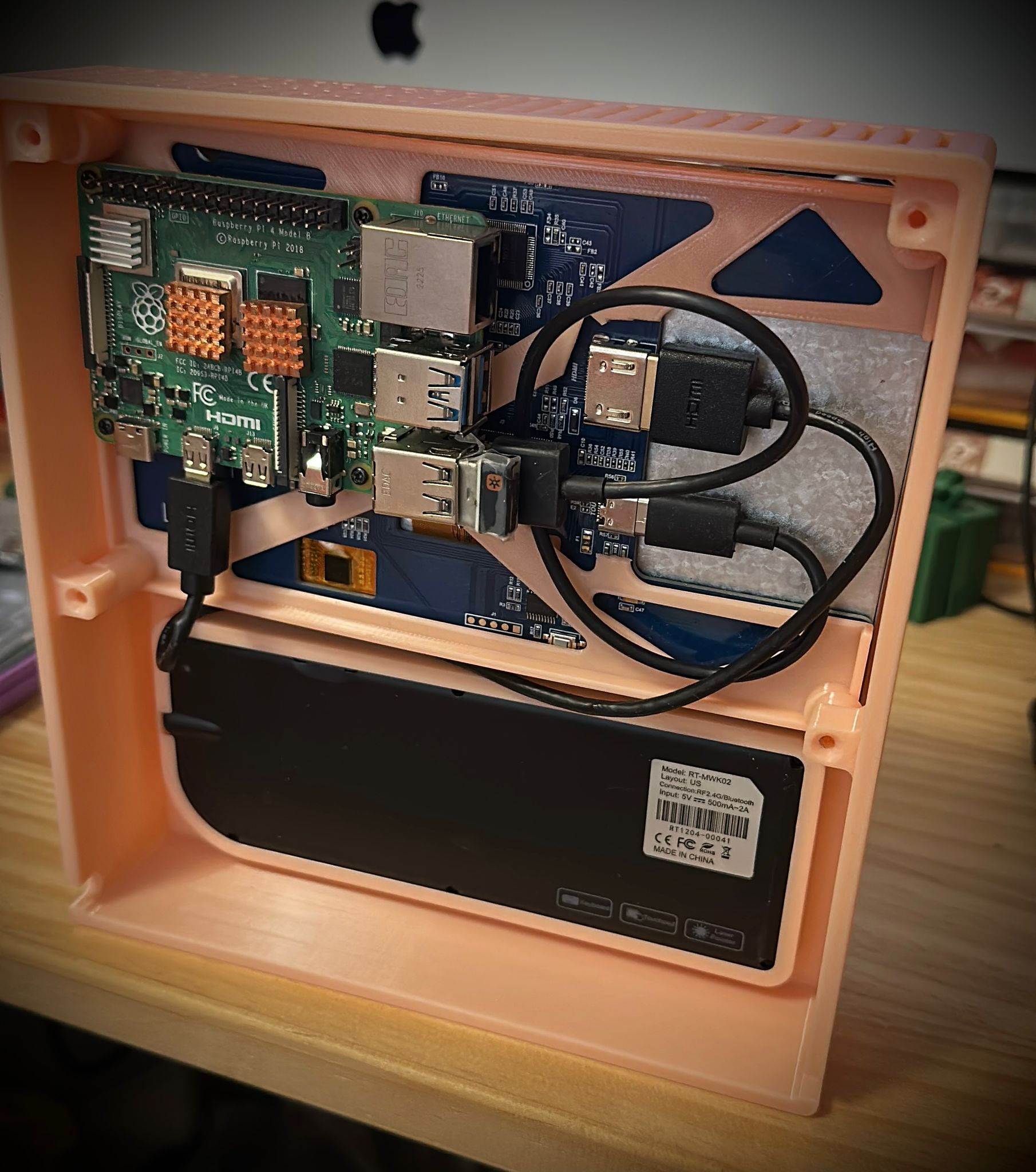
Pla 作petg的support 好用易拆,support面靚!
作者: xo_ox 時間: 2026-5-2 19:48
回覆 xo_ox
抽濕我都係鐘意鼓風方式的,又平效率又高。
佢4卷放唔同材料,唔同溫度又要攞起。
吾放齊4卷 ...
boldhk 發表於 2026-5-1 09:27
Finish Setup & working?
作者: boldhk 時間: 2026-5-3 00:10
回覆 81# xo_ox
Just finished setup.
Need to log in to update firmware.
Will try to print something later.
作者: xo_ox 時間: 2026-5-3 09:45
本身有desktop app 以login 中國account,
所以一開機,lan mode後便見到新機,
之後upgrade firmware…
連接vpn後,正常用到bambu handy
作者: boldhk 時間: 2026-5-3 12:03
本帖最後由 boldhk 於 2026-5-3 12:27 編輯
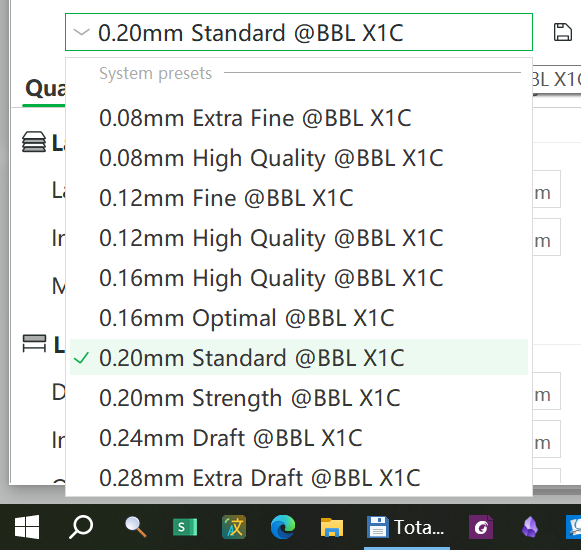
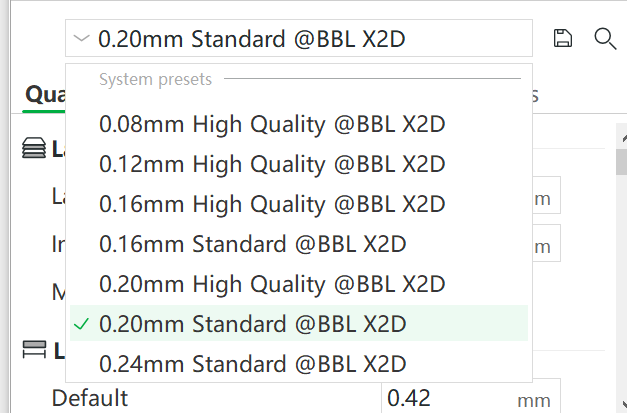
x2d對比P1,少咗有多Preset?
作者: xo_ox 時間: 2026-5-4 11:33
可能遲啲會加返呱?!
或者自己set
作者: xo_ox 時間: 2026-5-11 09:56
https://bambulab.com/en/support/firmware-download/x2d
OTA 01.01.00.00
New Features:
1. Added support for the Filament Switching Adapter
The filament track switch is specially designed for dual-nozzle printers, equipped with 2 filament inlets and 2 filament outlets, and supports seamless mapping between AMS and dual nozzles. For more details, please refer to the wiki: https://e.bambulab.com/t?c=s0CgMOrctZiPablB . This feature requires Bambu Studio v2.5.3.60 or later / Bambu Handy V3.18.0 or later .
2. Added support for "Print While Drying" feature.
Note: Please be aware of power limits. The drying temperature must not exceed the filament's softening temperature. Using this function requires an additional AMS external power supply, which must be purchased separately.
3. Added support for remote activation of filament drying
4. Added support for the High-Flow Hotend
This feature enables faster printing speeds with the optional High-Flow Hotend (sold separately).
It requires Bambu Studio V2.5.3.60 or later and Bambu Handy V3.18.0 or later.
5. Added support for saving timelapse videos locally (no USB flash drive required).
Also supports exporting internal time-lapse files and deleting internal/external time-lapse files.
6. Added support for Curve Planning Enhancement.
Improves how the printer processes curved paths which results in better surface quality in certain scenarios, especially on rounded features.
7. AI failure detection pop-ups now display live camera snapshots.
Live feed pop-ups are now supported for Foreign Object , Spaghetti , Print Loosening Detection and Nozzle Clumping Detection .
8. Optimized user onboarding experience.
A new orientation process has been added to help new users quickly get started and complete their first print. The orientation can be revisited later via "Toolbox - Beginner Guide."
9. Detailed explanations added to error code pop-ups.
Integrated with HMS to display possible error causes.
10. Added Low-Power Mode for the heatbed.
Designed for users with limited power supply environments. It lowers the maximum peak power by extending the heatbed's heating time.
11. Added support for "Disable Motor" mode for XYZ axes to facilitate maintenance and repairs
12. Added Foreign Object Detection beneath the heatbed.
The printer now performs a pre-print check to detect any obstructions under the heatbed reducing the risk of collisions or mechanical strain.
13. Added support for First Layer Quality Calibration.
Supports fine-tuning the distance between the nozzle and the heatbed during first layer printing, thereby improving first layer adhesion and surface smoothness.
Note: This feature is for pro users needing precise adjustments across diverse printing environments. Standard settings remain optimized for most use cases; please use this feature only as required for advanced troubleshooting or optimization.
14. Newly added information about regulation certifications.
15. Added support for live camera firmware upgrades, and optimized image quality in certain scenarios.
16. Updated demo models, optimizing the print quality of some demo models.
17. Added screen brightness adjustment.
18. Added Print Loosening Detection.
This feature uses a live camera inside the printer chassis to continuously monitor for print loosening and collapse during printing. Users need to enable the print loosing detection switch in the UI interface under "Settings -> Print Options -> AI Detection".
19. Adjust the AI detection switch option on the printer settings page.
Build Plate Presence Detection enabled by default. Intelligently detects and prompts the user if they forget to place the build plate, preventing other abnormal print failures.
Added toggles for foreign object detection
Added toggles for print loosening detection. ("printed part displacement detection" in UI)
20. Added support for Russian in the new printer UI
21. New PIN Code Binding Feature
After enabling this feature, binding no longer requires the printer and computer to be connected to the same local network. As lo ng as the necessary interfaces and protocols can communicate across different networks, the printer can be bound in Bambu Studio using a PIN code. This feature requires Bambu Studio to be updated to version 2.5.3.60 or higher.
22. New “Send Current Plate to Built-in Storage and Print” Feature
This feature allows users to send the current plate to the printer and start printing even without external storage (USB drive). This feature requires Bambu Studio to be updated to version 2.5.3.60 or higher.
23. New “Send to Built-in Storage and Print in LAN-Only Mode” Feature
This feature allows users to initiate remote printing using the printer’s built-in storage in LAN-only mode, even without external storage (USB drive). This feature requires Bambu Studio to be updated to version 2.5.3.60 or higher.
24. New Nozzle Heating Component Maintenance Mode Feature
When this feature is enabled, the heating component can be warmed up even without the hotend installed. This facilitates certain maintenance and repair scenarios, allowing users to perform toolhead-related maintenance.
25. Added Toolhead Cover Detection & Protection
Functional Optimizations:
1. Optimized the interaction flow of the upgrade process.
2. Optimize AI detection algorithms to improve the detection efficiency of foreign objects detection and Nozzle Clumping Detection.
3. Optimized the timelapse output for more stable footage.
4. Optimized the idle-state protection feature to support automatic heatbed cooldown when the printer remains idle.
5. Improved overall stability.
Optimized system, network, and connectivity stability, and fixed several rare bugs.
Known issues:
1. None
作者: hambaba 時間: 2026-5-11 11:23
可能遲啲會加返呱?!
或者自己set
xo_ox 發表於 2026-5-4 11:33
應該冇咩可能,材料參數P2S到而家都未補齊
作者: xo_ox 時間: 2026-5-14 20:07
今日買多個ams ht, rmb$571-
作者: Offer 時間: 2026-5-14 20:15
今日買多個ams ht, rmb$571-
xo_ox 發表於 2026-5-14 20:07
抵玩,PDD?
作者: xo_ox 時間: 2026-5-14 20:56
抵玩,PDD?
Offer 發表於 2026-5-14 12:15
TB 國補+88vip+618…. $571-
Pdd 國補 ⋯ ⋯ $580-
作者: alanwong912 時間: 2026-5-20 00:41
回覆 80# xo_ox
真係超正好吸引, 依家畫圖成日要諗打印方向...
作者: xo_ox 時間: 2026-5-20 08:28
回覆 xo_ox
真係超正好吸引, 依家畫圖成日要諗打印方向...
alanwong912 發表於 2026-5-19 16:41
by p1s & ams1?
作者: alanwong912 時間: 2026-5-20 10:36
回覆 92# xo_ox
p1S + ams2pro
單頭換色好易會甩搞到failed
作者: s84292 時間: 2026-5-22 08:27
本帖最後由 s84292 於 2026-5-22 00:28 編輯
有D想將公司部X1C 換呢部
打多色X1C AMS 成日卡住要搞一輪
我見行貨連AMS 2 PRO 只要8千,個價錢真係比X1C 平好多
不過我想問AMS2 PRO 係4進1出,咁佢雙頭時佢點操作?
可否裝兩部各自駁兩個頭
作者: 雀雀 時間: 2026-5-22 16:34
有D想將公司部X1C 換呢部
打多色X1C AMS 成日卡住要搞一輪
我見行貨連AMS 2 PRO 只要8千,個價錢真係比X1C ...
s84292 發表於 2026-5-22 08:27
要用 HT 或加多個 AMS
作者: s84292 時間: 2026-5-22 18:29
本帖最後由 s84292 於 2026-5-22 10:30 編輯
要用 HT 或加多個 AMS
雀雀 發表於 2026-5-22 08:34
thank
如果我只要兩色,但又想打印時可以keep 住乾,有冇咩好推薦。
因為我主要打pla-cf pet-cf
驚買ams2 都會卡
作者: xo_ox 時間: 2026-5-22 21:12
thank
如果我只要兩色,但又想打印時可以keep 住乾,有冇咩好推薦。
因為我主要打pla-cf pet-cf
驚買am ...
s84292 發表於 2026-5-22 10:29
新料ok, 卡料通常係Pla太舊自動斷成一截截.
最平可以兩個白盒,一邊一個⋯
但ams2 方便好多,petg 焗乾焗得乾好多…
Pla 焗完都係20-30 RH
作者: alanwong912 時間: 2026-5-26 21:58
回覆 83# xo_ox
係咪電腦要長開vpn先可用handy? 最近朋友想入坑 我想換國版x2d
作者: xo_ox 時間: 2026-5-27 00:02
本帖最後由 xo_ox 於 2026-5-26 16:04 編輯
回覆 xo_ox
係咪電腦要長開vpn先可用handy? 最近朋友想入坑 我想換國版x2d ...
alanwong912 發表於 2026-5-26 13:58
only printer need VPN china, so depending on your VPN device,
teach him/her to use lan mode law
作者: hambaba 時間: 2026-5-27 02:48
only printer need VPN china, so depending on your VPN device,
teach him/her to use lan mode law ...
xo_ox 發表於 2026-5-27 00:02
lan mode用bambu studio開唔到高級MODE 可以轉用OS 但用OS就唔好亂咁升固件